
1. はじめに
こんにちはNTTドコモ 第二プロダクトデザイン部の森田康平です。
普段の業務ではd払いをはじめとした金融系サービスのシステム基盤を担当しています。
突然ですが皆さん、うっかりミスは誰にでもありますよね。
行き先とは反対の電車に乗ってしまったり、出社したのに家にPCを忘れてしまったり、
そうそうあとは個人のAWSアカウントでハンズオンした後にAWSリソースの削除を忘れてしまったり。
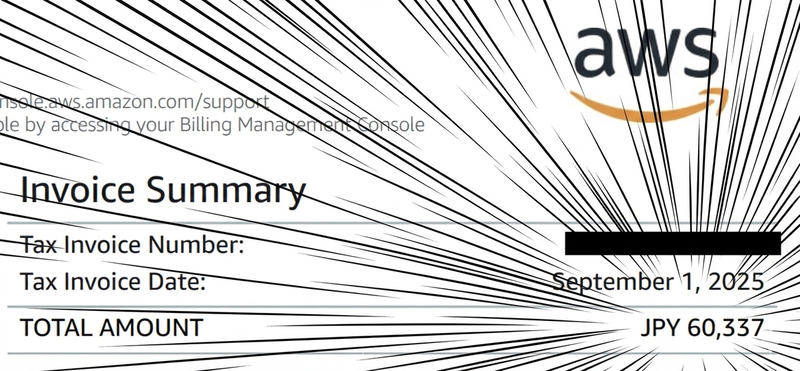
\(^o^)/
今回は、過去の戒めとしてAWSのコスト状況を分析してくれるAIチャットボットを作ります。
CloudWatch AlarmsやAWS Budgetsを利用することで、請求額のアラートを設定することができます。
簡単に設定できるので、この記事を読んだ方は必ず設定するようにしましょう。
シナリオ: CloudWatch で予想請求額をモニターリングする - Amazon CloudWatch
AWS Budgets によるコストの管理 - AWS コスト管理
2. 全体構成
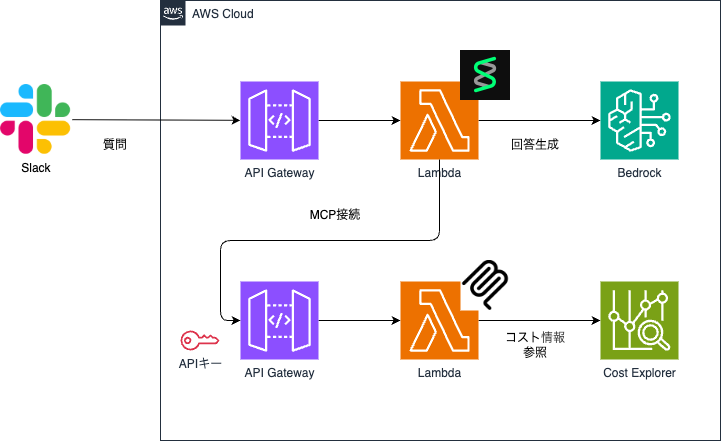
今回作成するアーキテクチャです。
チャットツールはSlackを利用し、コストを意識して実行環境はLambdaを選択しました。
AIエージェントの開発はStrands Agentsを利用し、コスト情報取得のためMCPサーバーを構築します。
また、MCPサーバーはAPI GatewayのAPIキーでアクセス制御しました。
3. 実装
3.1 MCPサーバーの実装
まずは、AWSのコスト情報を取得するMCPサーバーを作成します。
AWSから awslabs/mcp でMCPサーバーが提供されていますが、stdioのみの提供となっています。
そのため、今回はMCP AWS Lambda Handler Moduleを利用して、自前のMCPサーバーを実装しました。
import json
from datetime import datetime, timedelta
from typing import Dict

import boto3
from awslabs.mcp_lambda_handler import MCPLambdaHandler

ce_client = boto3.client('ce')

mcp = MCPLambdaHandler(
    name="aws-cost-mcp-server",
    version="1.0.0"
)


@mcp.tool()
def get_cost_and_usage(
    time_period_start: str,
    time_period_end: str,
    granularity: str = "MONTHLY",
    metrics: str = "UnblendedCost"
) -> Dict:
    """Get AWS cost and usage data for a specific time period."""
    metrics_list = [m.strip() for m in metrics.split(',')]
    return ce_client.get_cost_and_usage(
        TimePeriod={'Start': time_period_start, 'End': time_period_end},
        Granularity=granularity,
        Metrics=metrics_list
    )


@mcp.tool()
def get_service_cost_breakdown(
    time_period_start: str,
    time_period_end: str,
    granularity: str = "MONTHLY",
    metrics: str = "UnblendedCost"
) -> Dict:
    """Get AWS cost grouped by service for the specified time period."""
    metrics_list = [m.strip() for m in metrics.split(',')]
    return ce_client.get_cost_and_usage(
        TimePeriod={'Start': time_period_start, 'End': time_period_end},
        Granularity=granularity,
        Metrics=metrics_list,
        GroupBy=[{'Type': 'DIMENSION', 'Key': 'SERVICE'}],
    )


@mcp.tool()
def get_cost_forecast(
    time_period_start: str,
    time_period_end: str,
    granularity: str = "MONTHLY",
    metric: str = "UNBLENDED_COST"
) -> Dict:
    """Get AWS cost forecast for a future time period."""
    return ce_client.get_cost_forecast(
        TimePeriod={'Start': time_period_start, 'End': time_period_end},
        Granularity=granularity,
        Metric=metric
    )


@mcp.tool()
def get_last_month_cost() -> Dict:
    """Get AWS cost for the last month."""
    today = datetime.now()
    first_day_this_month = today.replace(day=1)
    last_day_last_month = first_day_this_month - timedelta(days=1)
    first_day_last_month = last_day_last_month.replace(day=1)

    return get_cost_and_usage(
        time_period_start=first_day_last_month.strftime('%Y-%m-%d'),
        time_period_end=first_day_this_month.strftime('%Y-%m-%d'),
        granularity="MONTHLY"
    )


@mcp.tool()
def get_this_month_cost() -> Dict:
    """Get AWS cost for the current month to date."""
    today = datetime.now()
    first_day_this_month = today.replace(day=1)
    tomorrow = today + timedelta(days=1)

    return get_cost_and_usage(
        time_period_start=first_day_this_month.strftime('%Y-%m-%d'),
        time_period_end=tomorrow.strftime('%Y-%m-%d'),
        granularity="DAILY"
    )


@mcp.tool()
def get_anomalies(
    time_period_start: str,
    time_period_end: str,
    max_results: int = 50
) -> Dict:
    """Get cost anomalies detected by AWS Cost Anomaly Detection."""
    return ce_client.get_anomalies(
        DateInterval={'StartDate': time_period_start, 'EndDate': time_period_end},
        MaxResults=max_results
    )


@mcp.tool()
def get_savings_plans_coverage(
    time_period_start: str,
    time_period_end: str,
    granularity: str = "MONTHLY"
) -> Dict:
    """Get Savings Plans coverage information."""
    return ce_client.get_savings_plans_coverage(
        TimePeriod={'Start': time_period_start, 'End': time_period_end},
        Granularity=granularity
    )


def lambda_handler(event, context):
    """AWS Lambda handler function for MCP requests."""
    if event.get('body') is None:
        return {
            'statusCode': 200,
            'headers': {'Content-Type': 'application/json'},
            'body': json.dumps({'status': 'ok'})
        }

    return mcp.handle_request(event, context)
3.2 AIエージェントの実装
次は、Strands AgentsでAIエージェントを作成します。
以下はStrands Agentsに関するコードを抜粋したものです。
Strands Agentsは少ないコードで簡単にAIエージェントを作成することができるため、シンプルで分かりやすいコードを作成できました。
from strands import Agent
from strands.models.bedrock import BedrockModel
from strands.tools.mcp import MCPClient
from mcp.client.streamable_http import streamablehttp_client
from config import get_mcp_api_key, get_mcp_url

model = BedrockModel(
    model_id="global.anthropic.claude-sonnet-4-5-20250929-v1:0",
)

SYSTEM_PROMPT = """あなたはAWSのコスト管理をサポートする親切なアシスタントです。
ユーザーの質問に対して、正確で役立つ情報を日本語で提供してください。

利用可能なツールを使って、以下の情報を提供できます:
- AWSのコストと使用状況の分析
- 将来のコスト予測
- コスト最適化の推奨事項

ユーザーが具体的なコスト情報を求めている場合は、適切なツールを使用してデータを取得し、
分かりやすく説明してください。"""


def ask_agent(question: str) -> str:

    api_key = get_mcp_api_key()
    mcp_url = get_mcp_url()

    # MCPサーバーに接続
    mcp_client = MCPClient(
        lambda: streamablehttp_client(
            url=mcp_url,
            headers={"x-api-key": api_key},
        )
    )

    with mcp_client:
        tools = mcp_client.list_tools_sync()

        agent = Agent(
            model=model,
            system_prompt=SYSTEM_PROMPT,
            tools=tools,
        )

        result = agent(question)
        return str(result)
3.3 実行確認
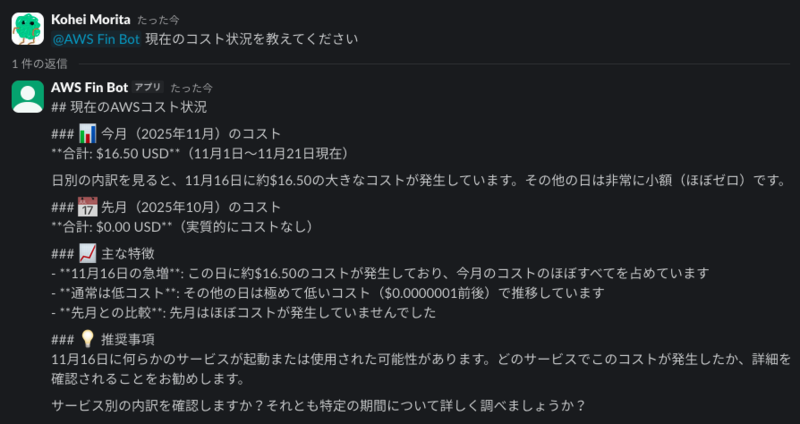
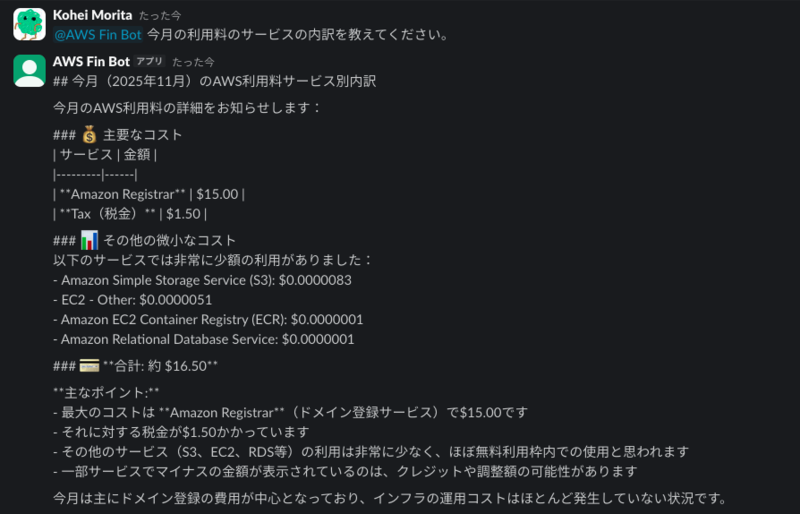
実際に使ってみた様子がこちらです。
MCPで取得したコスト情報から、利用状況やその内訳まで表示してくれています。
4. 最後に
今回初めて MCPサーバー と Strands Agents によるAIエージェントを開発したのですが、簡単にMCPを利用したAIエージェントを実装することができました。
これでもう二度とリソースの消し忘れはしない(はず)です!
最後まで読んでいただいた皆様もAWSリソースの消し忘れには十分ご注意ください。
